TCGScan - Poke Card Scanner
- 4.4
- Rating
- 100.00K
- Installs
- Free
- Price
 Analysis by App-foxy
I installed TCGScan to see whether it could make the unglamorous parts of collecting Pokémon cards easier. The app comes from PIXELDRILL and sits in the sports category, although its real purpose is much more practical: it helps turn a pile of cards into a searchable collection with value and price information attached. That makes it interesting for collectors who want to move quickly, especially when checking cards one by one feels like a chore.
My first impression was that this is not trying to replace the hobby itself. It does not make collecting more exciting by adding a game layer or social distractions. Instead, it focuses on the moment when you need to identify cards, understand what they may be worth, and keep your records in better order. The app is free to install, suitable for Everyone, and has reached over 100 thousand installs. Its average rating is 4.4 from around 1.9 thousand ratings, which suggests that the basic idea is working for a substantial group of users.
The important question is not whether scanning sounds convenient. It is whether the complete process is reliable enough to use when cards are mixed together, lighting is poor, names are difficult to read, or market prices are changing. After using it as a practical collection tool, I found that its value depends heavily on how carefully you handle the scan and how much trust you place in the result.
You May Also Like

 Blood Strike: 2.5 Anniversary
Blood Strike’s Loadouts Turn Every Drop Into a Tactical Gamble
A close look at Blood Strike’s custom loadouts: how fast access to signature weapons reshapes its battle royale rhythm, rewards preparation, and narrows the gap between fights.

 Pandora - Music & Podcasts
Pandora’s Music Is Easy to Start, but Harder to Recover
Pandora’s strength is its low-effort path from a seed to a station. Its weak spot is how much confidence it asks you to place in connection, setup, and quiet recovery.

 8 Ball Pool
 Is Built on Rivalries, Rematches, and Routine
A close look at the rivalries, rematches, shared routines, and unanswered safety questions that turn a quick pool match into a persistent mobile community.

 Samsung Music
’s Quiet Strength Is Playing What You Already Own
Its reach comes less from spectacle than from dependable access to a personal library. That simplicity is both the app’s strongest retention engine and its ceiling.

 AccuWeather: Weather Radar
AccuWeather Review: A Quick, Clear Forecast for Everyday Decisions
For everyday plans, the best forecast is the one you can understand quickly. AccuWeather makes rain timing, radar, and local conditions easy to act on, with a few trade-offs.

 Hill Climb Racing
Why Hill Climb Racing Still Turns Crashes Into One More Run
A tiny car, a bumpy hill and one more upgrade: Hill Climb Racing keeps resurfacing because its simple chaos makes every near-miss feel personal.
More From Our News Desk



From a loose pile of cards to a usable collection
I focus on the transition from an unsorted stack to records I can actually use, including why scanning in small, deliberate batches can make the process easier to trust. I also look at how a consistent routine helps me separate confirmed matches from cards that still need a closer check, so collection-building stays manageable rather than becoming another backlog.
Starting with the problem collectors actually have
A typical use case begins with a box, binder, or recent purchase that has not been organized yet. You may know that some cards are valuable, but checking each one manually means reading the name, identifying the set, comparing the artwork, and then searching for a current price. That process becomes especially tiring when several cards look similar or when you are sorting a large mixed batch.
TCGScan is built for that first step. Rather than opening a general web search for every card, I can use the phone camera as the entry point and let the app attempt to recognize the card. The benefit is not just speed. It also gives the collection a consistent starting record, which is useful when I want to revisit the same cards later instead of researching them from scratch.
I found the app most useful when I approached scanning as an inventory task rather than a valuation shortcut. Before opening it, I separated cards into manageable groups and kept similar-looking cards apart when possible. That small preparation matters. A clean, flat card with readable artwork gives the scanner a much better chance than a card half-covered by another card or sitting inside a reflective sleeve.
This is one of the less obvious trade-offs: the app can reduce repetitive searching, but it cannot remove the need for sensible sorting. If the starting pile is chaotic, the result may still require manual checking. The best workflow is to use the scanner for fast identification, then slow down for anything that could affect a sale, trade, or insurance record.
The scan itself and the first handoff
The central handoff is from the physical card to the digital record. I point the camera at the card, wait for the recognition process, and then inspect what the app has matched. That sounds simple, but the quality of this handoff depends on details collectors often overlook: glare on protective sleeves, shadows from overhead lights, bent cards, and artwork that resembles another printing.
For a smooth session, I would use even light and place the card on a plain surface. I would also avoid rushing through a stack by holding several cards in view at once. The app is designed to scan cards fast, but fast does not mean careless. A wrong match can look convincing if you only glance at the name, particularly when different versions share similar artwork.
After a match appears, I treat it as a proposed identification rather than an unquestionable answer. I check the set details and visual appearance before moving on. This habit is especially important for collectors who own older cards, special printings, or multiple versions of the same Pokémon. The scanner is valuable because it narrows the search; my judgment is still needed to confirm that the record belongs to the exact card in my hand.
That balance is where the app feels most realistic. It is considerably more convenient than typing every card into a search engine, but it is not a replacement for knowing what makes one printing different from another. Beginners may appreciate the speed, while experienced collectors will understand why confirmation remains part of the workflow.
Building the collection instead of scanning once
Once a card has been recognized, the next step is to keep the result organized. This is where the app becomes more useful than a one-time camera lookup. I can use it to grow a digital view of my collection, making it easier to remember what I already own and which cards still need attention.
For someone returning to collecting after a long break, this can be a practical reset. Rather than trying to reconstruct a collection from memory, I would scan the cards in batches: one binder page, one storage box, or one recent purchase at a time. That creates a repeatable process and reduces the temptation to mix confirmed cards with cards that still need inspection.
There is also a useful handoff between physical storage and digital tracking. If I reorganize a binder, the digital record can help me think about the collection as more than a pile of objects. I can identify duplicates, spot cards that deserve better protection, and decide which items are worth researching further. The app does not need to make those decisions for me; its value is giving me a clearer base from which to make them.
My advice is to avoid treating the collection as finished after one enthusiastic scanning session. A better routine is to scan newly acquired cards soon after getting them, then use occasional short sessions to process older boxes. This keeps the record closer to reality and prevents a large backlog from becoming another hobby task that gets postponed.
Passing from identification to value checking
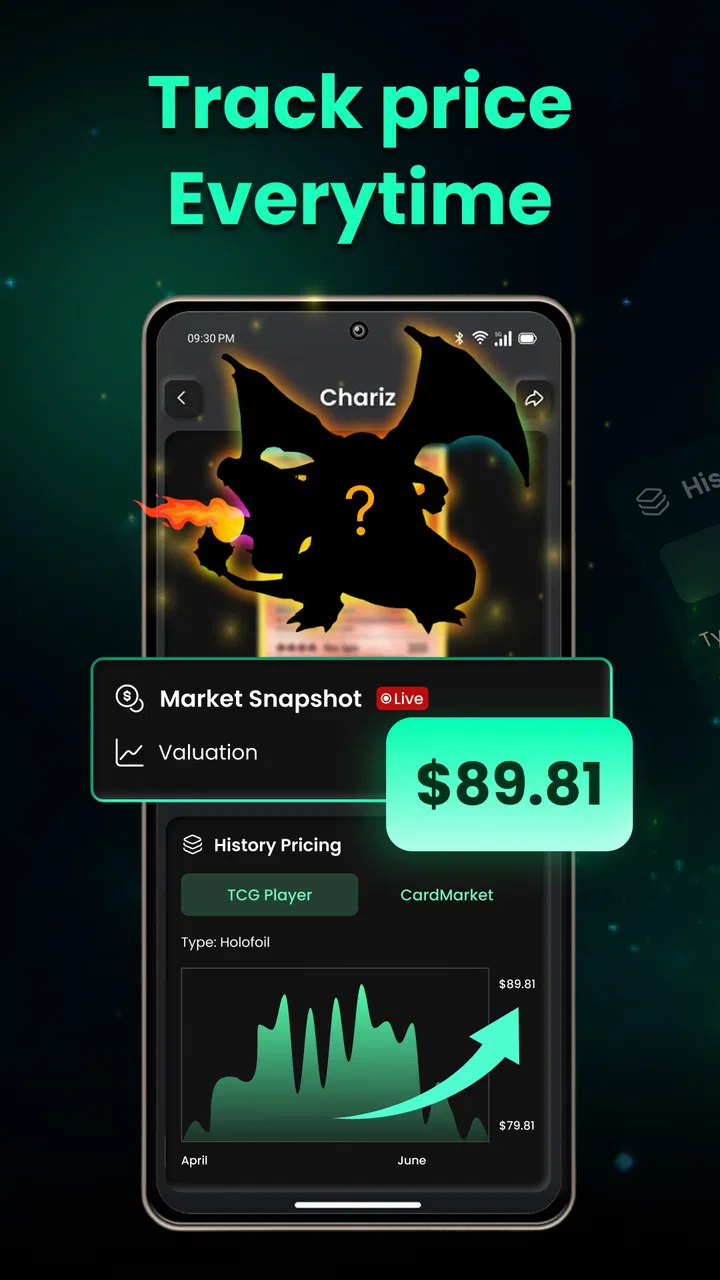
Identification is only half of the reason to use a card scanner. The next handoff is from “what card is this?” to “what is this card currently worth?” TCGScan includes value checking and price tracking, so it can help connect the card record with the market side of collecting.
I like this separation because a card’s identity and its value are related but not identical. The same character may appear in several sets, rarities, conditions, or printings. A scanner can help locate the correct entry, while the price view gives a starting point for understanding its market position. That is more useful than relying on a vague memory that a particular Pokémon card was expensive at some point.
Still, I would not use the displayed value as an automatic selling price. Card condition, language, centering, authenticity, and the exact version can change the real outcome. A price tracker is best used for prioritizing research: which cards deserve closer inspection, which ones should go into sleeves immediately, and which cards are ordinary parts of the collection.
This is one of the app’s strongest practical uses. It helps me decide where to spend my limited attention. Instead of examining every card with the same intensity, I can scan broadly, identify possible standouts, and then inspect those cards more carefully under good light. That workflow is faster and more sensible than assuming every number on a screen represents money I can immediately realize.
Tracking prices without losing perspective
Price tracking is helpful when I want to watch a card over time, but it can also encourage unnecessary checking. Collectors who constantly refresh values may end up reacting to short-term movement rather than making thoughtful decisions. I prefer to use the feature as a reference point when planning a trade, reviewing a collection, or deciding whether a card should be stored more carefully.
The practical advantage is that price information stays connected to the card record instead of living in a separate note or browser tab. That reduces the friction between cataloging and reviewing. If I am preparing for a trade event, I can first identify the cards I own, then focus on the entries that appear most relevant to the conversation.
There is a handoff here too: the app can inform a decision, but the decision still happens outside the app. A collector may take the card to a shop, compare listings, discuss condition with another collector, or choose to keep it for personal reasons. TCGScan supports that preparation; it does not turn a digital estimate into a guaranteed transaction.
For casual collectors, that distinction keeps expectations healthy. The app is more useful as a research assistant than as an authority. For serious sellers, a dedicated marketplace workflow may still be better when exact listing details, sales history, shipping, and buyer communication matter.
A realistic everyday workflow
Imagine I return from a local card purchase with a small stack containing common cards, duplicates, and a few attractive holographic cards. At home, I place the stack on a table, remove cards from sleeves only when necessary, and scan them individually. I confirm each match before adding it to the collection, then note which cards deserve a closer look.
When the app highlights a card that appears more valuable than the rest, I do not immediately put it up for sale. I check the card’s condition, compare the artwork and set information, and store it separately. Later, if I am preparing a trade, I can use the tracked collection to remember what I have and review current price information before making an offer.
The outcome is not dramatic, but it is genuinely useful: a messy purchase becomes a structured group of records, and the cards most deserving of attention are easier to find. Without a tool like this, I would probably research only the obvious cards and leave the rest undocumented. The scanner encourages a more complete inventory because the first step is quicker.
This workflow also shows why the app is suitable for more than experienced collectors. A newcomer does not need to understand every set before beginning. They can scan, inspect the suggested match, and gradually learn which details matter. At the same time, experienced users can move through routine cards quickly while reserving their expertise for unusual or high-stakes entries.
What happens when the workflow breaks
The process is not flawless. Recognition can become difficult when a card is inside a glossy sleeve, when the camera sees reflections, or when the card is worn and the important details are hard to read. A crowded background can also make the physical-to-digital handoff less comfortable. In those moments, I would rather retake the scan carefully than accept the first result simply to keep the session moving.
Similar cards are another likely point of friction. Pokémon cards can share names or artwork themes while belonging to different sets and rarities. If I scan quickly and fail to compare the result with the card itself, the collection may become inaccurate. That is not a minor issue for anyone using the app to estimate value, because a small identification error can lead to a very different price expectation.
Price information has its own limitation. Market values are not fixed promises, and the condition of the physical card may not match the assumptions behind a reference price. A heavily played card and a carefully stored card can produce very different real-world outcomes even when the digital entry is the same. I would therefore use the app to sort priorities, not to skip inspection.
There is also a possible cost consideration. The app is free, but it includes in-app purchases ranging from $3.99 to $39.99 per item. That means the free starting point is accessible, while users should still pay attention to what they choose to unlock or buy. I would begin with the basic workflow and only spend money if the additional value clearly supports my collecting habits.
Who benefits most from this app
I would recommend TCGScan to collectors who regularly acquire mixed cards and want a faster way to identify and organize them. It is particularly appealing if you have boxes waiting to be sorted, buy cards from different sources, or want a clearer view of duplicates and possible highlights. The combination of scanning, collection tracking, and price awareness gives the app a practical role between the physical binder and the online market.
It is also a good fit for families and younger collectors because the content rating is Everyone and the basic idea is easy to understand: show the card, review the match, and keep the record. An adult may still want to help with condition and value decisions, but the scanning process can make cataloging feel less intimidating.
I would be more cautious about recommending it as the only tool for professional buying or selling. If your work depends on exact grading, detailed sales history, inventory accounting, or marketplace fulfillment, you will probably need other tools alongside it. Likewise, collectors who own only a small number of cards and already know every item may not gain enough from scanning to justify changing their routine.
How it compares with familiar alternatives
The usual alternative is manual searching. That method can be more deliberate and may be better for verifying unusual cards, but it is slow and easy to abandon when a collection is large. TCGScan’s advantage is the first pass: it reduces typing and gives me a structured place to begin.
Another alternative is a spreadsheet or handwritten inventory. Those options offer flexibility and personal control, but they require me to enter names, sets, and values myself. They are useful when I want custom fields or a completely independent record. TCGScan is more convenient when my priority is getting cards into a collection quickly and connecting them with price information.
Dedicated marketplace tools may be stronger for selling, while general camera search tools may be better for broad visual research. TCGScan occupies a narrower and more useful middle ground for Pokémon card collecting. Its strength is not that it does everything; it is that scanning, cataloging, and value checking belong to one focused workflow.
Device details and day-to-day practicality
The app requires Android 8.0 or later, so it remains accessible on many older Android phones rather than demanding a recent flagship. That matters for families using a spare device or collectors who do not upgrade frequently. Camera quality and lighting will still affect the experience, but the operating-system requirement itself is not especially restrictive.
PIXELDRILL has continued the app through version 2.9, and the release date was March 21, 2024. I see that as useful context for expectations: this is a focused tool that should be judged by how well it handles the collection workflow, not by whether it behaves like a full social platform or a professional auction system.
In everyday use, I would keep a simple habit: scan in batches, confirm uncertain matches immediately, separate cards that need condition checks, and review tracked prices only when there is a reason to make a decision. That approach prevents the app from becoming another source of noise and makes its organizational strengths more visible.
My final assessment
After following the process from a loose pile of cards to a more useful digital inventory, I see TCGScan as a practical companion for collectors who value speed and structure. Its best contribution is not a single scan. It is the chain that follows: identify the card, add it to the collection, check its value, monitor relevant prices, and use that information to decide what deserves further attention.
The app works best when I treat its results as helpful guidance rather than unquestionable truth. Good lighting, careful confirmation, and a realistic understanding of condition remain essential. If I need professional-level selling tools or highly customized records, I would look beyond it. But for turning an unorganized Pokémon card collection into something easier to understand, it offers a convincing balance of convenience and useful detail.
My recommendation is straightforward: try the free version if you have a backlog of cards or regularly need to check what you own. Start with a small batch, test how well the recognition fits your cards, and only consider in-app purchases if the workflow becomes part of your regular collecting routine. For the right collector, that modest first step can save a surprising amount of repetitive searching.
FAQs for TCGScan - Poke Card Scanner
01What is TCGScan - Poke Card Scanner used for?
TCGScan - Poke Card Scanner is designed to identify Pokémon trading cards using your phone’s camera and provide useful information about them. Depending on the card and available database data, the app may show the card name, set, number, rarity, estimated market value, and other collecting details. It can be helpful when organizing a collection, checking cards while trading, or quickly researching cards without searching manually.
02How accurate is TCGScan when recognizing Pokémon cards?
Recognition accuracy can vary depending on the card’s condition, lighting, camera focus, language, and how clearly the card is positioned. Cards with glare, damaged surfaces, unusual layouts, or partial visibility may require another scan or manual selection. The scanner is convenient for quick identification, but results should be checked carefully, especially before selling, trading, grading, or making decisions based on a card’s estimated value.
03Can TCGScan show the current value of my Pokémon cards?
TCGScan may provide price or market information for recognized cards, but these figures should be treated as estimates rather than guaranteed selling prices. Pokémon card values can change frequently according to demand, condition, edition, language, market, and whether a card is graded. Before buying or selling, compare the displayed information with recent listings and reputable marketplaces to confirm the card’s current value.
04Does TCGScan support different Pokémon card sets and languages?
The app’s coverage may depend on its card database and the version currently available on your device. Many popular Pokémon sets may be recognized, but older releases, promotional cards, regional editions, and cards in less-supported languages may not always scan correctly. If a result looks wrong, compare the set symbol, collector number, artwork, and card text, then try scanning again or searching manually.
05Is TCGScan - Poke Card Scanner free to download and use?
The app may be available to download at no initial cost, but some features can depend on advertising, in-app purchases, subscriptions, or usage limits. Review the store listing carefully before installing and check the app’s payment terms if premium tools are offered. Also consider its privacy permissions, particularly camera access, and only grant the permissions needed for scanning and normal operation.
Pros
- Quickly identifies Pokémon cards using the phone camera.
- Useful for checking card prices before buying or trading.
- Supports collection tracking in a convenient digital format.
- Helps organize cards without manually entering every detail.
- A practical tool for casual collectors and market research.
Cons
- Recognition may fail with glare
- sleeves
- or damaged cards.
- Price estimates can vary across marketplaces and change frequently.
- Some features may require an account or in-app purchases.
- The app depends on a stable internet connection for database access.
- Older or less common cards may have limited information.

TCGScan - Poke Card Scanner
Gallery